MCP server
GitDash speaks the Model Context Protocol, so an AI assistant can use it while it helps you. There are two endpoints on every GitDash host, and both are read-only:
| Endpoint | Sign-in | What it gives the assistant |
|---|---|---|
/mcp | None | The public documentation: setup, configuration, access control and what every metric means. |
/mcp/me | GitHub, through GitDash, or a personal MCP key | The same documentation tools, plus seven data tools that read your repositories, pull requests and costs as you. Only on instances that turn it on (see below). |
Connect to the docs (/mcp)
| Client | How |
|---|---|
| Claude (claude.ai, Desktop) | Settings → Connectors → Add custom connector, URL https://www.gitdash.info/mcp |
| Claude Code | claude mcp add --transport http gitdash https://www.gitdash.info/mcp |
| Cursor | Add the server to .cursor/mcp.json (below) |
| MCP Inspector | npx @modelcontextprotocol/inspector |
{
  "mcpServers": {
    "gitdash": { "url": "https://www.gitdash.info/mcp" }
  }
}
A self-hosted GitDash serves the same endpoint on its own domain.
Docs tools
| Tool | What it returns |
|---|---|
list_docs | Every docs page with its id, title, summary and URL. |
search_docs(query) | The five best-matching pages, each with an excerpt and URL. |
get_doc(page) | One whole page as Markdown, by id. |
explain_metric(metric) | What a metric measures, how it is calculated and what good looks like — e.g. lead time, change failure rate, MTTR, bus factor. |
Connect with your data (/mcp/me)
Use https://<your GitDash host>/mcp/me, for example in Claude: Settings → Connectors → Add custom connector. The client discovers the sign-in on its own. In Claude Code:
claude mcp add --transport http gitdash https://<your GitDash host>/mcp/me
The first time the assistant uses it, this happens:
- The assistant opens GitDash in your browser. If you are not signed in, GitHub asks you to sign in. This sign-in asks GitHub only for
repo,read:organdread:user, fewer scopes than the web sign-in. If you are already signed in to GitDash with GitHub, the app gets your existing web sign-in, with its scopes. - GitDash shows which app is asking, and where it will send you back. Check the host, then choose Allow.
- The app receives an encrypted token and calls the tools. You never paste a token.
Connect with a personal key
Signed in to GitDash with a personal access token, running GitDash in standalone mode, or using a client without the sign-in flow? Create a personal MCP key and send it as a header instead. Claude Code, Cursor and Claude Desktop's config file accept it; the claude.ai connector screen supports only the sign-in above.
- Open Settings → Connected apps and choose Create MCP key.
- Give it a label, such as “Claude Code on my laptop”, and choose Create key.
- Copy the key, or one of the ready-made snippets, straight away. GitDash shows it only once.
claude mcp add --transport http gitdash https://<your GitDash host>/mcp/me --header "Authorization: Bearer <key>"
{
  "mcpServers": {
    "gitdash": {
      "url": "https://<your GitDash host>/mcp/me",
      "headers": { "Authorization": "Bearer <key>" }
    }
  }
}
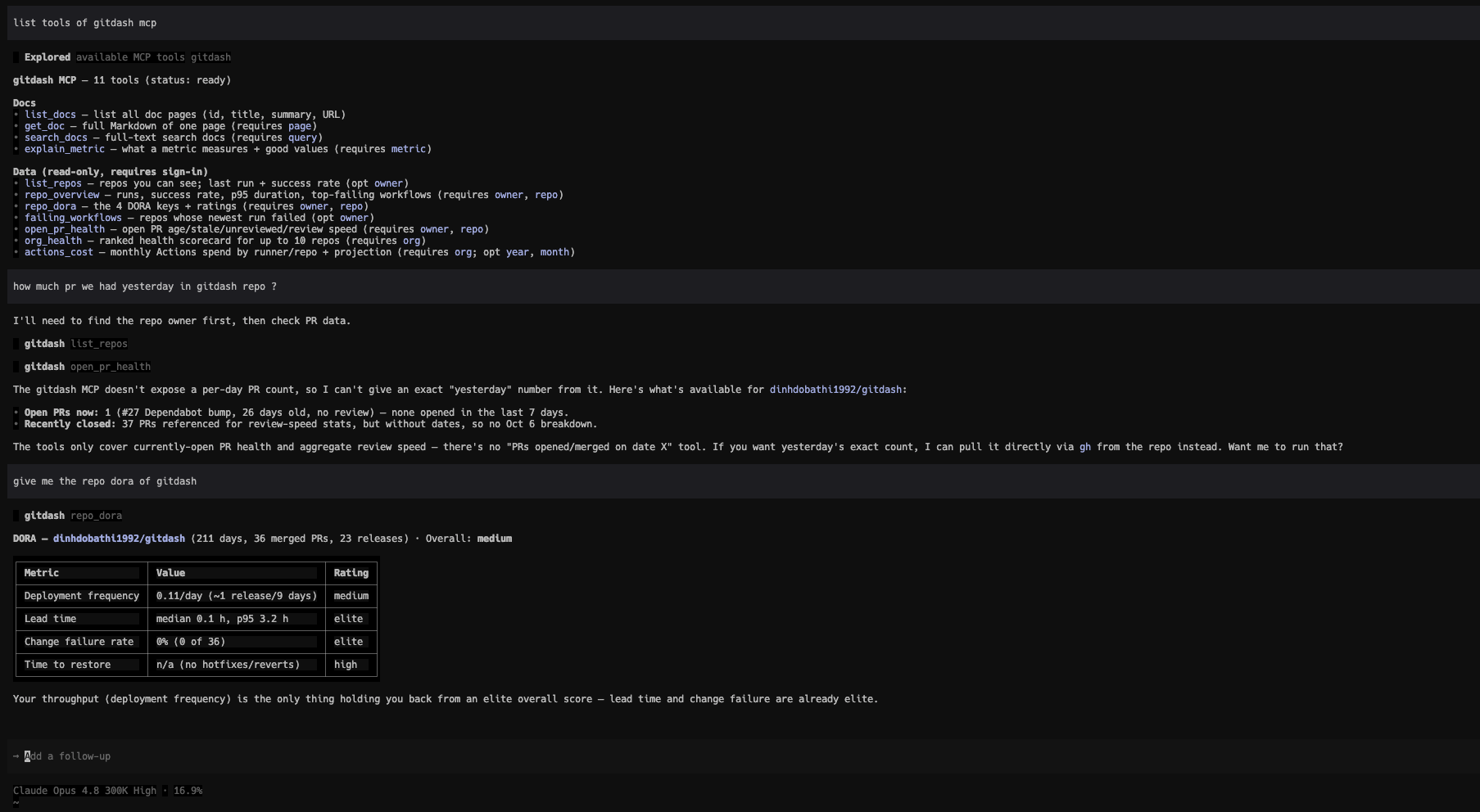
Once connected, ask in plain words. Below, Cursor's agent lists the GitDash tools, checks open pull-request health and reads a repository's DORA keys:
Data tools
Every tool is read-only and runs with your own GitHub access. Each one is checked against the same groups and feature grants as the matching screen, so a tool your group does not have answers with an error.
| Tool | What it returns |
|---|---|
list_repos(owner?) | Repositories you can see: name, language, visibility, and for the most recently updated ones the last run and the success rate of the last 10. |
repo_overview(owner, repo) | Workflow runs, success rate, p95 duration and the most-failing workflows of one repository. |
repo_dora(owner, repo) | The four DORA keys with their ratings and how each is measured. |
failing_workflows(owner?) | Repositories whose newest decisive run failed, worst success rate first. |
open_pr_health(owner, repo) | Open pull requests: age buckets, stale and unreviewed counts, review speed, the oldest PRs. |
org_health(org) | Ranked health scorecard for up to 10 repositories of an organization. |
actions_cost(org, year?, month?) | GitHub Actions minutes and USD by runner and repository for a month, with the month-end projection. |
Revoke an app or a key
Open Settings → Connected apps. Each app row shows the host the app returns to, the name it gives itself, when it connected and when it was last used; each key row shows “Personal key”, its label, when it was created, last used and when it expires. Choose Revoke and confirm. GitDash stops accepting that app's token or that key within a minute. Admins see every user's apps under Admin → Connected apps and can revoke any of them. Apps can also revoke their own token, and anyone holding a personal key can revoke it, at /oauth/revoke (RFC 7009, organization mode).
Revoking in GitDash does not touch GitHub. To cut GitHub access as well, revoke GitDash in GitHub → Settings → Applications; GitDash then drops the grant the next time the app calls it. If a key leaks and you created it while signed in with a personal access token, revoke the key and also rotate that token on GitHub.
Turn it on (operators)
/mcp/me, the sign-in endpoints and the Connected apps screens are off by default and answer 404. Set GITDASH_MCP=true (Helm: config.mcp: true) with MODE=organization, a database and NEXT_PUBLIC_APP_URL, and add the second GitHub callback URL <origin>/api/auth/callback/mcp to your OAuth App. The Configuration page lists every variable. The public /mcp endpoint needs none of this.
Standalone mode has no GitHub OAuth App, so it has no sign-in flow: with GITDASH_MCP=true, DATABASE_URL and NEXT_PUBLIC_APP_URL set, /mcp/me accepts personal keys only and the /oauth endpoints stay off. Without a database, creating a key answers 409: a key is only issued when it can be revoked.
Limits
/mcp allows 300 requests a minute per IP address on each server instance. /mcp/me allows 60 a minute per connected app or key. The docs tools only read public documentation; your dashboards and GitHub data are reachable only through /mcp/me, after you sign in.